September 21, 2026 - Spotify, Deezer, LinkedIn and multi-platform import
A batch of updates to blocks and to how you can get started on your page:
- Spotify and Deezer each get their own layout: a simple card for a single track, and for a playlist or album, the full track list with cover art and a play button.
- The LinkedIn block now pulls your boxed.ink name and photo, editable right on the card: click the name to change it, click the photo to pick another one.
- Import the links from an existing profile in one click: paste the url of a Linktree, Lnk.Bio, Bio.fm, Taplink or Later profile and we'll pull in all its links for you.
September 21, 2026 - Stats just went a lot further
A few days after launch, Pro stats got a big upgrade:
- Average time spent on your page and average scroll depth, on top of the total view count.
- Where your visitors come from: countries and cities with their flag, plus an interactive world map colored by visit volume.
- What they use to read you: a breakdown by device, operating system and browser, with real full-color logos.
- Their browser's language, and what's driving your traffic: a ranking of your traffic sources (Instagram, TikTok, search, direct...) with their logo.
- Unlike other tools, none of this is locked behind an extra paid tier — it's all included with Pro.
- Until you have real data, a realistic preview shows you what the page will look like once your page starts getting traffic.
September 17, 2026 - Stats are live for Pro members
The Stats feature promised since Pro launched is finally here:
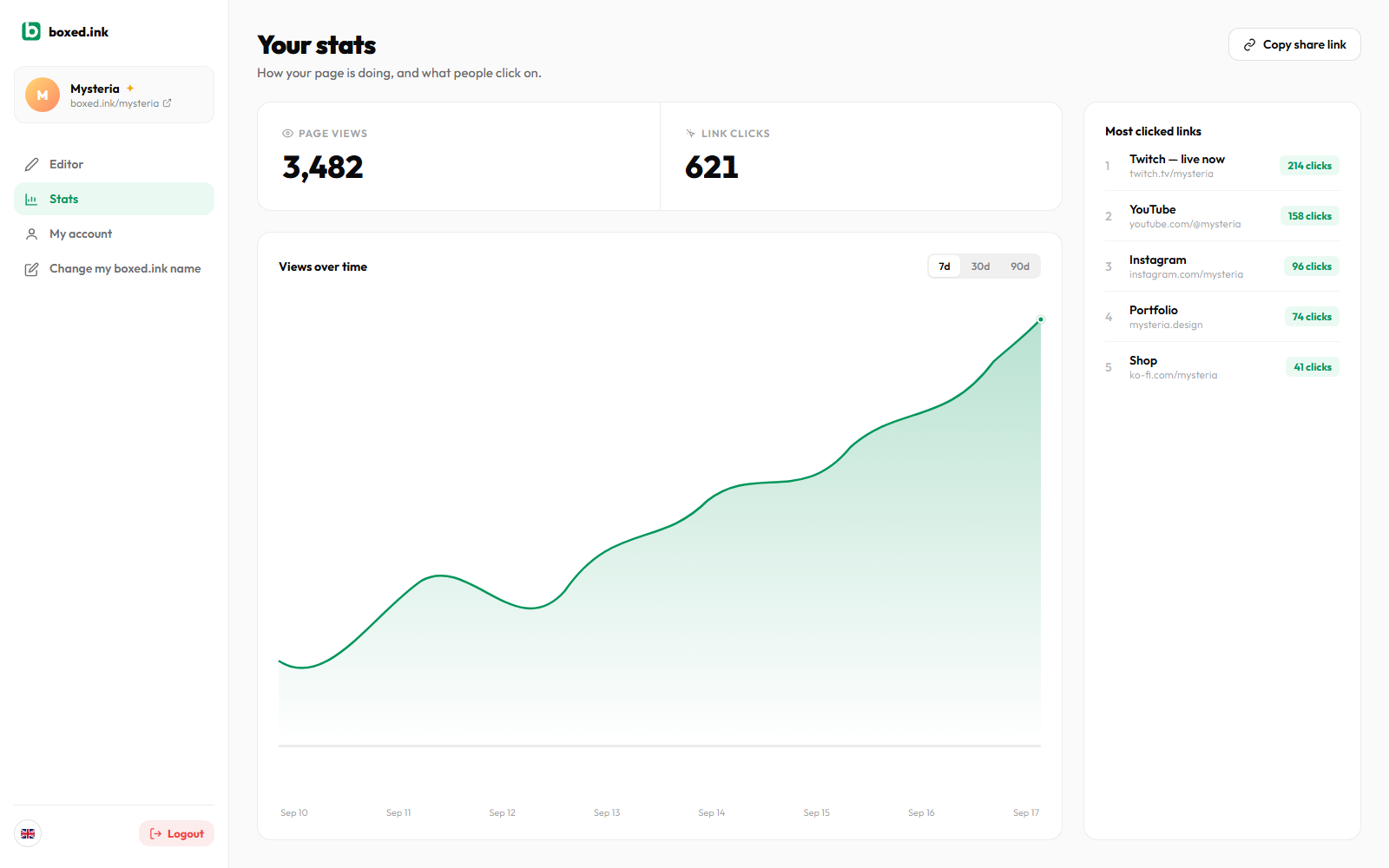
- See how many people visit your page with a total view count and a trend chart over 7, 30 or 90 days.
- Find out what they click on with a ranking of your most popular links and their click counts.
- Counting is protected against spam: refreshing your own page over and over won't inflate your numbers, and your own visits as the owner are never counted.
- A new sidebar lets you navigate between the editor, stats and your account, with a mobile-friendly menu.
- Your account now has its own page: a subscription recap and one-click billing management.
September 14, 2026 - boxed.ink is live on PeerPush
boxed.ink is now listed on PeerPush:
- Find boxed.ink on PeerPush and support the launch by upvoting or leaving a review.
- A PeerPush badge has been added to the homepage.
September 4, 2026 - Captions for image blocks
Image blocks can now carry a short caption:
- Add a caption to any image block from the editor. It sits right under the image, clamped to two lines so it never overflows the block.
- It shows up the same way on your published page, and stays optional: leave it empty and the image just fills the block on its own like before.
September 2, 2026 - TikTok is live for everyone
TikTok has approved the boxed.ink app: connecting is no longer limited to testing, you can use it right now.
- Connect your TikTok account from a link block and it turns into a card with your latest 3 videos, stacked vertically with the newest in front, and your follower count.
- On your published page, every thumbnail is clickable and opens the video straight on TikTok.
- Connecting stays optional and reversible at any time: disconnect and the block goes back to being a plain link, with the fetched content wiped.
- If your account hasn't posted anything yet, the block shows a neutral preview rather than an empty gap.
August 13, 2026 - A clearer editor
The add menu has been rebuilt, plus a few finishing touches all over:
- The add-block menu is much bigger and shows what each block looks like before you even click, with its name and what it does. No more tiny icons you had to hover to understand.
- The page background gets its own section, clearly separated from the blocks: the colour tile shows the current colour and its code, and the image tile shows a preview of your current background.
- You can now drag and drop your background image straight onto its tile, just like on link blocks.
- The add-link window lists every platform we recognise with its logo: Twitch, YouTube, Instagram, TikTok, X, Facebook, Snapchat, Discord, WhatsApp, GitHub, Patreon, Ko-fi and Buy Me a Coffee. You know at a glance what you can paste. Email addresses and phone numbers work too.
- The Twitch block flags a live stream with a pulse around the channel avatar and the status, in Twitch colours.
- Block shadows and borders have been softened and made consistent, in the editor and on your published page.
August 12, 2026 - Instagram and TikTok, connected
Your social blocks can now show real content instead of just a link:
- Connect your Instagram and the block turns into a card with your 4 latest posts and your follower count. Connecting is optional. Decline and it stays an ordinary link block.
- Connect your TikTok to show your 3 latest videos, stacked vertically with the newest in front, plus your follower count.
- Follow and Support buttons now use each platform's own colours, on X, Instagram, TikTok, GitHub, Patreon, Ko-fi and Buy Me a Coffee.
- You can now drag and drop an image straight onto a link block, without going through the file picker.
- Link blocks lost the external-link icon and the url line. The space goes to the title and the image, with the Follow button sitting at the bottom.
August 11, 2026 - Follow buttons and custom link images
More control over what a link block shows, and a new way for people to act on it:
- Link to your Twitter/X, Instagram, TikTok, GitHub, Patreon, Ko-fi or Buy Me a Coffee profile and the block now shows a Follow or Support button. It only appears on an actual profile page, never on a random post. GitHub also shows a live follower count.
- In the 4x4, 4x2 and 2x4 formats, you can now upload your own image for a link block instead of relying on the scraped preview. Change or remove it anytime, and a placeholder prompts you to add one whenever there's nothing to show (no image, or a broken one).
August 11, 2026 - Richer link cards
Link blocks can do more now, especially in the bigger sizes:
- In the 4x4, 4x2 and 2x4 formats, a link block now shows the page's actual preview image when it has one, not just a small favicon.
- Image blocks can be cropped and zoomed now, not just repositioned. Drag to pan and use the zoom control to get closer. The block size stays the floor, so you can never zoom out past what actually fills it.
- You can drop a mailto: or tel: link (or just paste an email address or phone number) straight into a link block. It shows a mail or phone icon instead of trying to fetch a favicon for it.
August 8, 2026 - A smoother editor
A pass on how the editor feels to use, not just what it does:
- Dragging a block now has some weight to it. It tilts and lifts in the direction you're moving it, and the little edit icons get out of the way while you drag instead of cluttering the view.
- Saving no longer spams you with a toast every few seconds. The share button just does a quick checkmark pulse when your change lands.
- Every loading state in the app, from the dashboard to your page to sign-in, now uses the same clean logo animation instead of a mix of different spinners.
August 8, 2026 - Introducing boxed.ink Pro
boxed.ink stays free forever, but there's now a Pro plan (€4.99/mo) for people who want to go further. First up is a custom domain instead of boxed.ink/yourname, coming soon. You can subscribe now from your account menu and you'll be the first to get it.
August 8, 2026 - Speak your language
boxed.ink is now available in English and French. The landing page, the editor, your published page and this changelog all follow whichever you pick. Switch anytime with the flag in the top corner.
August 7, 2026 - Block polish, all around
A round of quality-of-life improvements across most block types:
- Link blocks got a redesign. Edit the title directly on the block instead of being stuck with whatever the page's metadata gave you, the full URL now shows below it, the whole block is clickable and opens in a new tab, and colors auto-adjust for readability whatever background you pick.
- Image blocks are centered and auto-fitted to the block by default now, instead of needing a manual crop every time. You can still drag to crop manually if you want a specific framing.
- Text blocks no longer jump into edit mode on a single click while you're rearranging your page. Double-click (or double-tap on mobile) to edit, then click away to go back to normal.
- Your location is now shown on a real interactive map (search-as-you-type, zoomable) instead of just as text.
August 6, 2026 - Twitch and YouTube channel blocks
You can now drop a Twitch or YouTube channel link straight into your page. We automatically fetch the channel's avatar, name and live status (or category for Twitch), and turn it into a proper card with a Watch button. No manual setup needed.
August 5, 2026 - SidePro is now boxed.ink
This project started at the end of 2025. Bento.me had already been sold off to Linktree back in 2023, and in February it finally shut down for good, taking the bento-grid page builder people actually liked down with it. What replaced it (Linktree, Beacons, Bio.fm...) felt like a step backward: plain lists again. SidePro was born out of that gap, then sat unfinished for a while. We picked it back up, rebuilt it properly, and gave it the name it has today: boxed.ink.
